Group map on the Karoo
BetaA map of the riders sharing Beacon with you, or your ride group, with the nearest rider ahead, the nearest behind and the last rider listed under it.
Aktualisiert am 2026-10-31
Group map shows where everyone is. Each rider who shares their Beacon with you is drawn on a simple map around you, with their gap.
How to read it
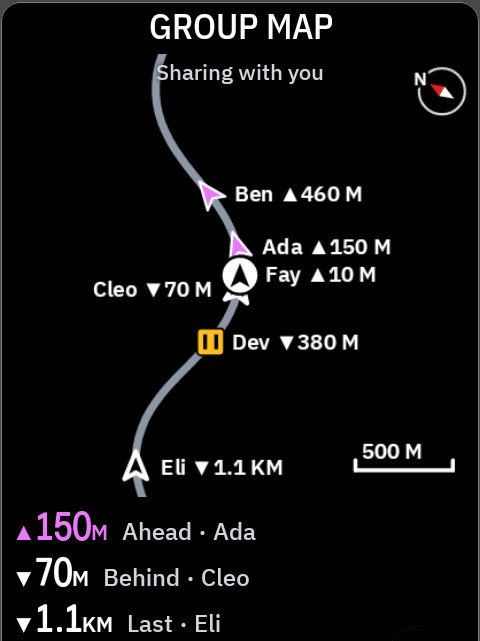
- You are the arrow in the middle. The map turns with you (heading up) unless you switch it to north up.
- Under the header it says whose positions it shows: "Sharing with you", or your ride group's name.
- Each rider is an arrow turned to their heading, with their name and gap: "Ben ▲460 M". ▲ is ahead of you, ▼ behind.
- The list below the map shows the nearest rider ahead, the nearest behind, and the last rider: "▲150M Ahead · Ada".
| Mark | Means |
|---|---|
| Filled arrow | Ahead of you |
| Outlined arrow | Behind you |
| Pause square | Stopped |
| Clock ring | Position older than 45 seconds |
| Red octagon | SOS |
- Riders ahead are fuchsia. Amber always means a warning.
~marks an estimate, in the list and on the map labels.- "35s ago" in the list means that rider's position is old. It appears from 30 seconds.
When someone sends an SOS
The map shows "SOS" and the rider's name in a red banner, with their distance and "open Beacon on your phone". During a ride, the Karoo switches to its map page once for that SOS and zooms out until every rider in SOS is in view. It stops if you touch the map. A rider in SOS stays on the map, with the age of their last update, for up to 10 minutes.
Sizes
| Size | What you see |
|---|---|
| Full or two-thirds | The map and the list |
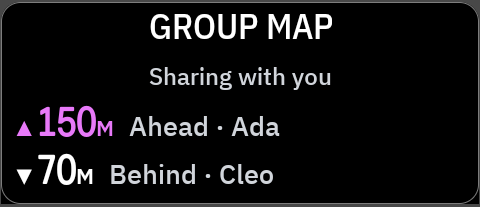
| Half or third | The list: nearest ahead and nearest behind |
Messages
| On screen | What it means |
|---|---|
| No one is sharing with you yet · Ask riders to share Beacon with you in NeverChill | Nobody shares their Beacon with you right now. |
| No one in (group name) is sharing with you | Your chosen ride group has nobody sharing right now. |
| Choose a group · Pick one in the NeverChill extension settings | Choose whose positions to show. |
| No group · Join a ride group in NeverChill | You chose a group view but have no group. |
| Connecting | Finding the riders sharing with you. |
| Waiting for GPS · Your group appears once you have a fix | No GPS fix yet. |
| Offline · last update 2 min ago | No answer from NeverChill. After about two minutes the riders are hidden, because a share may have ended. |
| Sign in · Pair this Karoo in the NeverChill app | Pair the Karoo again. |
Settings
In NeverChill on the Karoo, under Beacon group.
| Setting | Choices | Default |
|---|---|---|
| Beacon group map | Heading up, north up | Heading up |
| Beacon gap alert | Off, 250, 500, 1000 m | 500 m |
| Beacon riders to show | Everyone sharing with me, or one of your ride groups | Everyone sharing with me |
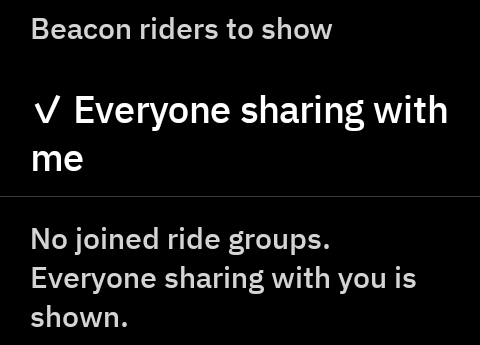
Everyone sharing with me shows up to 30 riders whose live Beacon you can already see, no group needed. Alerts work as described in Group gap.
On the Karoo map
Turn on the NeverChill map layer and the same rider arrows appear on the Karoo's own map.
What it needs
- NeverChill Pro and a paired Karoo.
- Riders who share their Beacon with you in NeverChill.
- A connection during the ride, through Wi-Fi or the Hammerhead Companion app.
Good to know
- Positions can be up to 20 seconds old when they arrive. The Karoo moves each rider forward along the road to where they probably are now. A stopped rider, or one whose position is older than 45 seconds, stays where they were.
- Your own position is the Karoo's live GPS.
Tips
- Two thirds of a page for Group map and one third for Group gap makes a good group ride page.