Centar za pomoćHammerhead Karoo
Weather map on the Karoo
BetaWind, rain and temperature around you, now and over the next two hours, with or without a route.
Ažurirano 2026-10-31
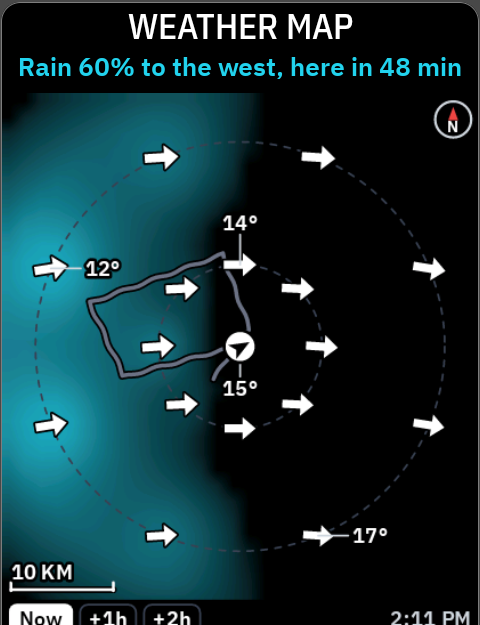
Weather map shows the weather around you: where the rain is, where it's heading, and how the wind blows. It works with or without a route.
How to read it
The full page is a map centred on you, with north up:
- Your arrow in the middle, a compass and a scale bar.
- Two faint rings at 8 km and 20 km.
- Wind arrows at points around you, pointing where the wind blows, drawn as on Route weather.
- Rain, shaded cyan.
- A few temperatures.
- Your route, as a thin grey line, when you navigate one.
The line above the map is the most useful news, in this order:
- Rain here: "Rain here now · 70%".
- Rain coming to you within 2.5 hours, and where it is now: "Rain 60% to the west, here in 48 min".
- A wind of 15 km/h or more: "Wind 18 km/h from W · gusts 29".
- Rain nearby that isn't coming to you: "Rain 65% to the north, 20 km".
- A change of 3° or more over the next two hours: "6° colder by 17:40 · 9°C".
- Otherwise light wind and the temperature: "Light wind from SW · 14°C".
The time selector under the map reads "Now · +1h · +2h", with the frame on screen filled and its clock time.
- While you ride, it stays on Now. The map never changes under a glance at speed. The line above already says what the later hours bring.
- When you are stopped, not recording or paused, it steps through Now, +1h and +2h every 5 seconds.
~ marks a stale Now frame, 15 minutes overdue, as on Route weather.
Sizes
| Size | What you see |
|---|---|
| Full page | The line and the map with the time selector |
| Half page | The line and the map |
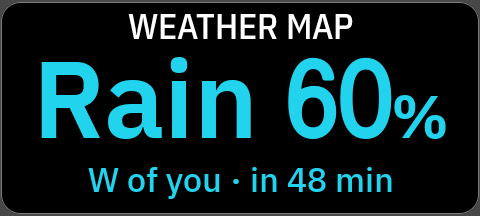
| Third or quarter | One value and one line: "Rain 60%", "W of you · in 48 min" |
Messages
| On screen | What it means |
|---|---|
| Waiting for GPS | The map is centred on your position. It needs a fix. |
| No weather data | No forecast for this spot yet. |
| No connection | Connect Wi-Fi or the Hammerhead Companion app. |
| NeverChill is unreachable · Retrying | NeverChill did not answer. The Karoo keeps trying. |
| Not available yet | Weather map comes with a NeverChill update. |
| Needs Pro | Needs NeverChill Pro. Pair the Karoo again if you have it. |
| Turned off | Route weather is off for your Karoo. Turn it on in NeverChill. Weather map uses the same switch. |
| Sign in | Pair the Karoo again in NeverChill. |
A failed refresh keeps the last frames and shows their age.
Settings
Weather map shares the Route weather settings. With Wind on the map on, the Karoo map shows Weather map's wind arrows around you when you're not navigating a route. While you navigate, the map shows the wind along your route instead. The two are never drawn together.
What it needs
- NeverChill Pro and a paired Karoo.
- A connection, through Wi-Fi or the Hammerhead Companion app.
- GPS. A route is optional.
Good to know
- It refreshes every 15 minutes while you record (30 when you don't), or after you move 5 km.
- Rain "here in 48 min" comes from hourly forecasts. Treat it as a heads-up, not a countdown.
Tips
- Use it with Route weather: Route weather for the road ahead, Weather map for the bigger picture when you're choosing where to ride.