Centar za pomoćHammerhead Karoo
Live segment on the Karoo
BetaYour segment effort on one full page - the gap to your PR or the leader, distance left, time, and the elevation profile with you and the pace marker on it.
Ažurirano 2026-10-31
Live segment puts a whole segment effort on one page. The gap is the headline. Everything else you need is under it.
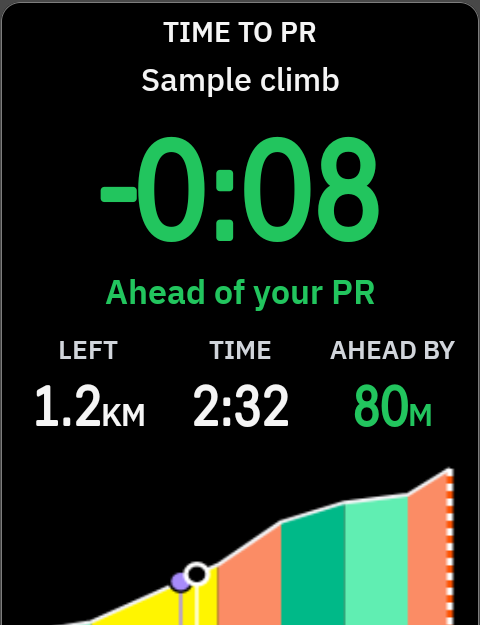
How to read it
From top to bottom while you ride a segment:
- Header: TIME TO PR, or TIME TO LEADER when you have no PR on it. SEGMENT TIME when there is no time to race.
- Segment name.
- The gap,
-0:08. Minus is ahead. Green ahead, red behind. - The words: "Ahead of your PR", "Behind the leader", "Level with your PR". "No target time" when there is nothing to race.
- LEFT: distance to the finish.
- TIME: your time on the segment so far.
- AHEAD BY / BEHIND BY: how far you are from the pace marker, in distance.
- Elevation profile: what is done and what is left, with you and the pace marker on it.
The pace marker rides your PR effort as you rode it, or the leader's time. On the Karoo map it shows as PR pace or Leader pace.
Before and after
| On screen | When |
|---|---|
| NEXT SEGMENT, distance and name | No segment close by |
| SEGMENT AHEAD, distance "to the start" | You are close to a start |
| NEW PR | You beat your PR |
| SEGMENT TIME, with "7s faster than your PR", "Same time as the leader" | Just finished. LENGTH, AVG GRADE and PR (OLD PR after a new PR) or LEADER under it |
| Star segments in NeverChill · A segment shows here as you ride up to it | There are no segments to show |
Sizes
Built for a full page. In a smaller cell it shows the gap and less detail. For a small cell, use Segment instead.
Messages
Waiting for GPS, Sign in, No connection, NeverChill is unreachable · Retrying, Turned off. See Segment and Troubleshooting.
Settings
Live segment shares the Segments settings: the approach alert, segment sounds, and the map at a segment start. See Segment settings.
"Show the map at a segment start" only jumps when neither the map nor Live segment is on screen.
What it needs
- NeverChill Pro and a paired Karoo.
- Starred segments, or public segments near your ride. Open NeverChill on Wi-Fi before you ride to download them.
- GPS. A route is not needed.
Tips
- Put Live segment on its own page, right after your main page. It is one swipe away when a segment starts.
- Add Segment to your main page to see the next segment coming.