Centro assistenzaHammerhead Karoo
Group gap on the Karoo
BetaHow far ahead the front of your group is, and how far back the last rider is, from the riders sharing Beacon with you.
Aggiornato il 2026-10-31
Group gap tells you how spread out your group is: the distance to the rider at the front and to the rider at the back. It uses the riders who share their Beacon with you.
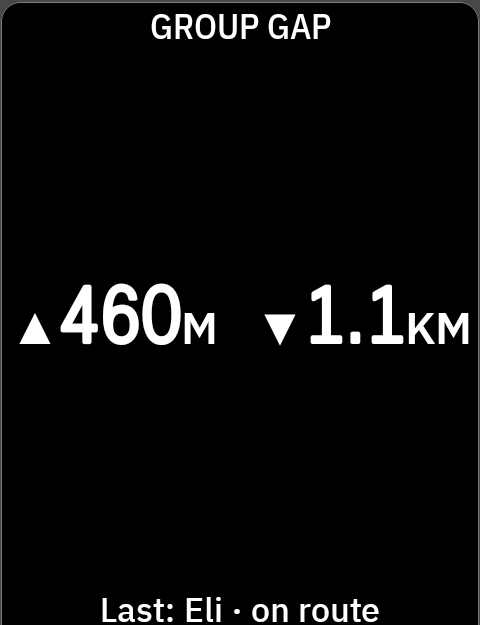
How to read it
- ▲ is the front, the rider furthest ahead of you. ▼ is the back, the last rider behind you.
▲460M ▼1.1KMmeans the front is 460 m up the road and the last rider is 1.1 km back. - Lead in place of ▲ means you are at the front. Last in place of ▼ means you are at the back.
~means an estimate: a gap measured in a straight line, or to a position the Karoo moved forward to where the rider probably is now.▲ ~460M.- SOS in red, with the rider's name and distance, takes over the field when a rider sends one.
The line under it names the last rider and how the gap was measured: "Last: Eli · on route".
| Word | How the gap was measured |
|---|---|
| on route | Along the route the Karoo is navigating |
| by road | Along the road you have ridden this ride, without a route |
| direct | A straight line. The real road may be much longer. |
When nobody can be placed on a road, the field shows the furthest rider in a straight line: ~1.1KM, "Furthest: Eli · direct".
Sizes
| Size | What you see |
|---|---|
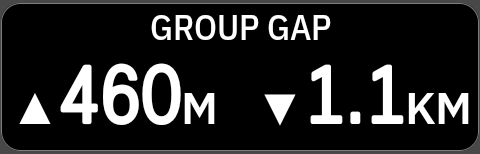
| Half page or larger | Both gaps and the line under them |
| Third, quarter, half-width | Both gaps alone |
Messages
| On screen | What it means |
|---|---|
| No one sharing · Ask riders to share Beacon with you | Nobody is sharing their Beacon with you right now. |
| No one in group | Nobody in your chosen ride group is sharing with you right now. |
| Connecting | Finding the riders sharing with you. |
| Waiting for GPS | Your group appears once you have a fix. |
| Offline | No answer from NeverChill for about two minutes. Riders are hidden until it's back. |
| Sign in | Pair the Karoo again in NeverChill. |
| Turned off | Beacon group fields are off for your Karoo. Turn them on in NeverChill. |
Settings
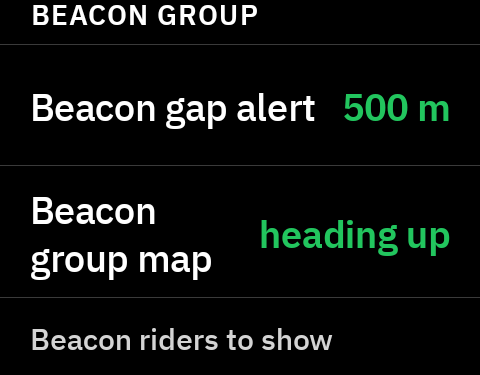
In NeverChill on the Karoo, under Beacon group.
| Setting | Choices | Default |
|---|---|---|
| Beacon gap alert | Off, 250, 500, 1000 m | 500 m |
| Beacon riders to show | Everyone sharing with me, or one of your ride groups | Everyone sharing with me |
Alerts. An SOS always alerts. With a ride group chosen, the Karoo also alerts when a rider stops, or when the gap passes your threshold. It alerts again only after that clears. With Everyone sharing with me, only an SOS alerts: a friend riding across town is not a gap.
If the group you chose ends or you leave it, the field goes back to everyone sharing with you.
What it needs
- NeverChill Pro and a paired Karoo.
- Riders who share their Beacon with you in NeverChill. A ride group alone is not enough: each rider shares their live location.
- A connection during the ride, through Wi-Fi or the Hammerhead Companion app.
Good to know
- Positions lag. A rider's position can be up to 20 seconds old when it arrives, about 220 m at 40 km/h. The Karoo moves each rider forward to where they probably are now and marks that with
~. - A rider who has stopped or lost signal is not moved forward.
- A switchback can make a straight-line gap kilometres short. That's why "direct" gaps carry
~.
Tips
- On a group ride, put Group map on two thirds of a page and Group gap on the last third.