Route weather on the Karoo
BêtaWind, rain and temperature along the rest of your route, with a wind map. In a small cell, the one thing you need to know next.
Mis à jour le 2026-10-31
Route weather tells you what the weather does along the rest of your route: where the headwind starts, when rain arrives, and whether it gets colder.
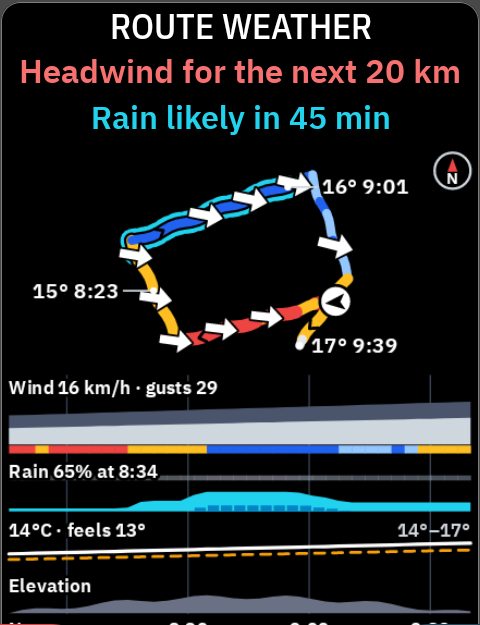
How to read it
- The wind number is the part that hits you, the headwind or tailwind along your direction of travel. It is not the total wind speed.
- The arrow points where the wind blows, with your direction of travel up. ↓ is a headwind (red). ↑ is a tailwind (green). A sideways arrow is a crosswind.
- Rain is cyan, everywhere.
~marks a stale forecast. When the forecast is 15 minutes overdue, during a ride or after a failed refresh, every size shows~and the line says how old it is, "Forecast 20 min old".
Sizes
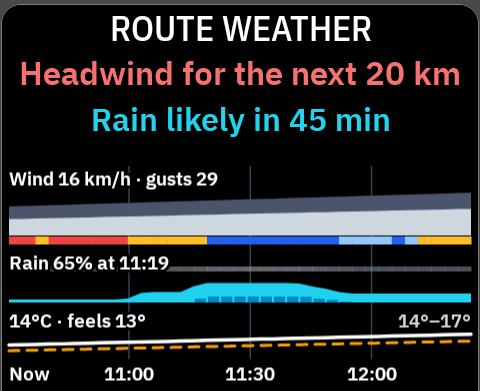
Full page. The route ahead as a map with wind arrows, the headlines ("Headwind for the next 20 km", "Rain likely in 45 min"), and four strips against the clock: wind and gusts, rain chance, temperature and feels-like, and elevation.
Half page. The headlines and the strips.
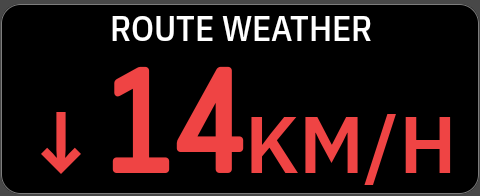
Third or quarter. One number and one line: the most important news, in this order.
- Rain within 30 minutes: "Rain 60%", "In 12 min".
- A headwind of at least 2 km starting within 45 minutes: "↓14KM/H", "Headwind in 3 km".
- A drop of 4° or more within an hour: "9°C", "6° colder in 40 min".
- Otherwise the wind here: "Headwind here", "Tailwind here", "Crosswind here".
Without a route
It shows the weather where you are: "No route · wind here". For the weather all around you, add Weather map.
Messages
| On screen | What it means |
|---|---|
| Getting forecast | The first forecast is on its way. |
| Waiting for GPS | The forecast follows your position. It needs a fix. |
| No connection | Connect Wi-Fi or the Hammerhead Companion app. |
| NeverChill is unreachable · Retrying | NeverChill did not answer. The Karoo keeps trying. |
| Not available yet | Route weather comes with a NeverChill update. |
| Needs Pro | Needs NeverChill Pro. Pair the Karoo again if you have it. |
| Turned off | Route weather is off for your Karoo. Turn it on in NeverChill. |
| Sign in | Pair the Karoo again in NeverChill. |
Settings
In NeverChill on the Karoo, under Route weather.
| Setting | Choices | Default |
|---|---|---|
| Wind on the map | On, Off | On |
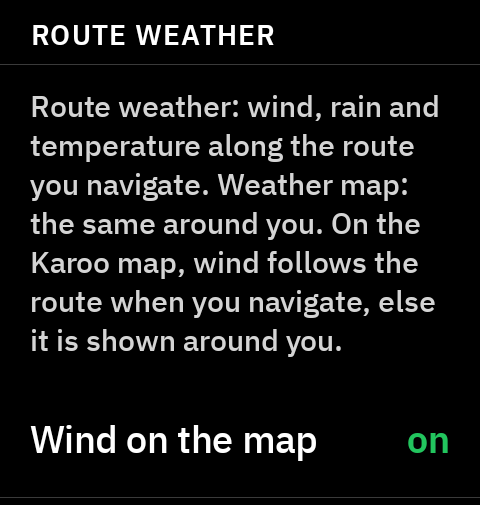
With Wind on the map on and the NeverChill map layer turned on, wind arrows follow your route on the Karoo map while you navigate.
What it needs
- NeverChill Pro and a paired Karoo.
- A connection during the ride, through Wi-Fi or the Hammerhead Companion app. Open NeverChill on Wi-Fi before you ride for a fresh forecast.
- A route for the weather ahead. Without one, you get the weather here.
Good to know
- Forecasts come by the hour, so "in 12 min" is a forecast, not a radar reading.
- Forecast wind is measured 10 m up. On the road, in a valley or behind hedges, you'll usually feel less.
Tips
- Put it in a third or half of your main page. The full page is best at a café stop or in the first minute of a ride.